 1132 Fixer
1132 Fixer for macOS
Requirements
Latest published build: Loading.... Source requires macOS 13 or later. Universal release targets Intel and Apple Silicon. Minimum macOS version.
Before you run
Download the app from macOS releases. Open the DMG file and install the app. Keep macOS security checks enabled.
What changes
Start Zoom closes Zoom, stops Zoom updater processes/agents, checks VPN and network state, deletes Zoom local data, flushes DNS with administrator approval, and launches Zoom through sandbox-exec. Camera and microphone permissions are requested for that launch. On macOS 13, network repair can change/reconnect the interface MAC address. Source disables MAC spoofing on macOS 14 and later. Action sequence; Exact commands.
Data removed
Deleted paths under your home Library: Application Support/zoom.us; Caches/us.zoom.xos; Preferences/us.zoom.xos.plist; Saved Application State/us.zoom.xos.savedState; and Logs/zoom.us.log*. Reset signs you out and removes local settings/logs. Back up needed state first. App removal does not restore it.
Updates and reports
Network: launch checks api.github.com for updates. Optional bug report sends title, optional email, message, system information, and diagnostics attachment to the configured endpoint; source default is 1132-bug-report-production.up.railway.app. Zoom itself uses its own network connections. Update request; Report fields and endpoint. Server retention, current release endpoint configuration, and crash-report collection remain unverified.
Reversal and troubleshooting
Reversal: quit the sandboxed Zoom session and start Zoom normally. Uninstall the fixer from Applications. Restore deleted state only from a backup. Review disabled Zoom launch agents and re-enable them or reinstall Zoom if its updater does not resume; restore prior network settings if the macOS 13 network step changed them. There is no verified one-click rollback. If VPN check stops the run, review the network before retrying. If administrator approval fails, inspect the prompt and activity log.
Limits
These tools change local state. They cannot confirm why Zoom refused access, remove an account restriction, or guarantee recovery.
Related guides
References
Source and license details checked 2026-10-04.
Project screenshot
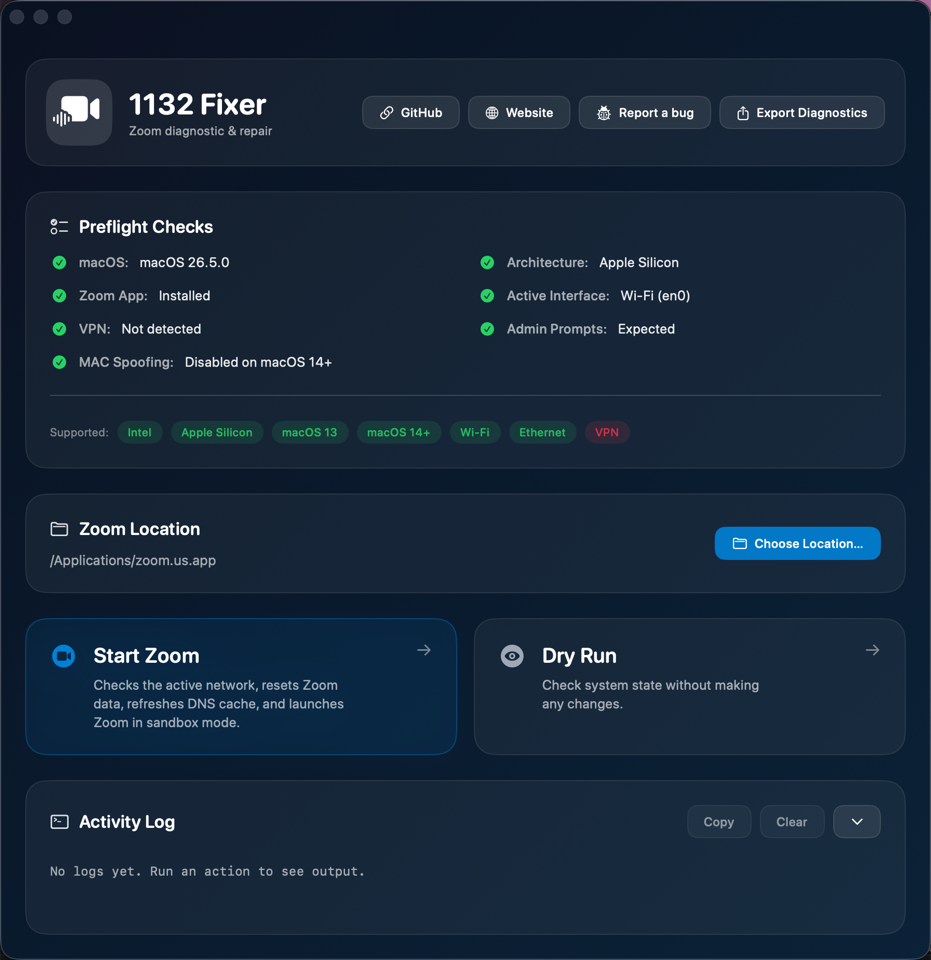
Project capture. Capture version/date and current release appearance not independently verified.